
Family Chore Manager
KronickelParenting
4.126.00 Reviews
- Version
- 1.7.0
- Installs
- 10.00K
- Age Rating
- Everyone
Screenshots
Our Review of Family Chore Manager
 Analysis by Appyee
When chores are spread across a busy household, the hardest part is often not doing the work but agreeing on who is responsible and when it needs to happen. Family Chore Manager is a parenting app from Kronickel that gives families a shared place to organize tasks and connect them with rewards. I see its main value as making expectations visible: instead of relying on repeated reminders or someone’s memory, everyone can refer to the same routine.
The app is free to download, with optional in-app purchases ranging from $3.99 to $19.99 per item. It is rated for Everyone, has an average rating of 4.0 from around 96 ratings, and has passed 10K+ installs. Its current version is 1.6.1, and it was released on October 28, 2024. Those details place it among relatively recent family chore tools, so I would treat its present set of features as useful but still evolving rather than assume it has the long-established polish of an older household platform.
Organizing household routines
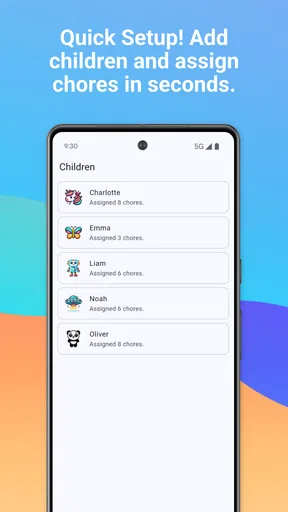
First things first, the setup process is super straightforward. You download the app, create your family or household group, and you’re off to the races. You can easily add members by sending them an invite link, and voilà! You’re all connected. What I really like is that it doesn’t require everyone to be tech-savvy. Even your tech-challenged Uncle Bob will find it pretty intuitive.
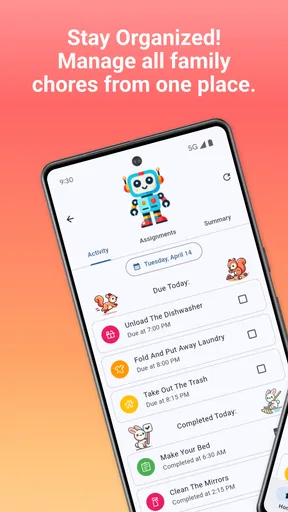
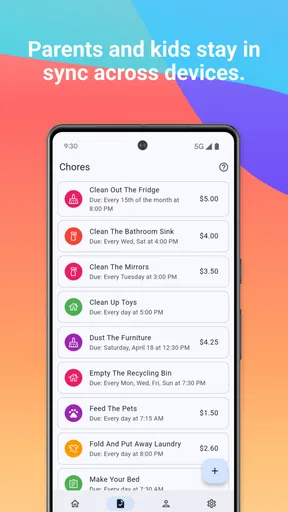
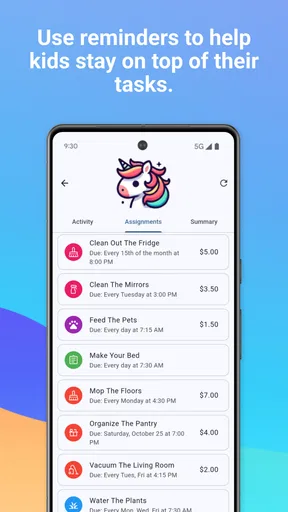
Once your group is set up, you can start assigning chores. The interface is clean and pretty user-friendly, with big, colorful buttons that make it easy to navigate. You can assign tasks based on frequency, like daily, weekly, or even monthly, which is perfect for those recurring responsibilities like taking out the trash or mowing the lawn.
Recurring chores and rewards
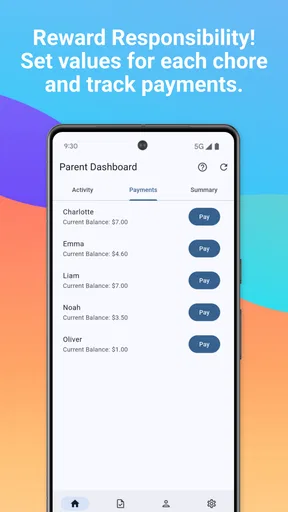
One of the standout features is the reward system. It turns chores into a game, which is a clever way to motivate everyone. You can set up a reward system where members earn points for completing tasks, and these points can be redeemed for custom rewards. Maybe it’s a movie night or an extra hour of screen time—whatever works for your family dynamics.
Another cool thing is the calendar view. It gives you a snapshot of what’s due and when, so there are no surprises. Plus, you can sync it with your Google Calendar, which is a lifesaver if you’re like me and live by your digital planner.
What it changes in daily use
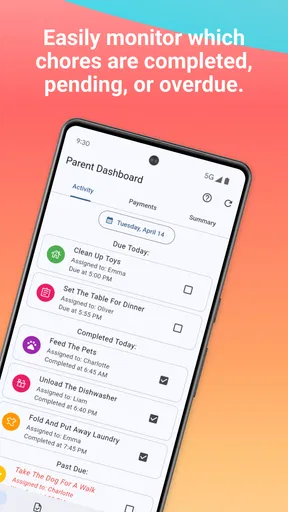
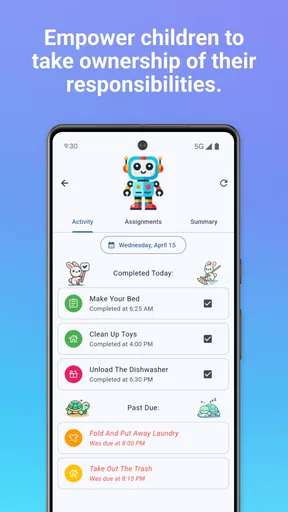
Using the app is pretty seamless. I’ve noticed that it genuinely helps to cut down on the "I thought you were going to do that" moments. Everyone knows what they need to do, and when it’s due. It’s all about that transparency and accountability, which I think is a game-changer for any household.
Notifications are a nice touch too. You get gentle reminders about upcoming tasks, which means fewer forgotten chores. And let’s be real, who hasn’t forgotten to feed the dog at least once?
For an existing user, version 1.6.1 is the clearest marker of the app’s current state, not proof of a particular feature change. I would avoid assuming that a newer version automatically means a major redesign or that an older setup has been replaced. If you already have a working household routine, a sensible approach is to keep your recurring chores and rewards stable, then review the app after updating and only adjust the parts that your family actually finds awkward. That keeps a software change from becoming a reason to renegotiate every responsibility at once.
Make the system fit your household
Here’s a little tip: Make sure everyone buys into the system. It only works if everyone participates. Maybe start with a family meeting to discuss the rewards and get everyone excited. I’ve found that involving everyone in deciding those rewards can really boost engagement.
Also, don’t be afraid to adjust as you go. The app is flexible, so you can tweak tasks and rewards based on what works best for your crew. It’s all about finding that sweet spot of motivation and fairness.
A useful way to prevent the points system from turning into a negotiation is to agree on reward rules before the first chore is assigned. Keep the first rewards modest and specific, and make sure the work required feels proportionate. A reward that takes weeks to reach may not motivate a younger child, while a reward for every tiny action can make the tally feel more important than helping. The app can make the arrangement visible, but the family still has to decide what counts as fair.
A realistic week at home
Imagine a household where one parent has late workdays, a child has after-school activities, and another adult handles weekend errands. A shared schedule can help separate daily jobs, such as tidying up, from less frequent tasks like mowing the lawn. Each person can check what is due rather than waiting for a parent to assign everything in the moment. The calendar view is especially useful here: it can help the family notice a crowded day before adding another task, and Google Calendar syncing can keep household duties visible alongside existing plans.
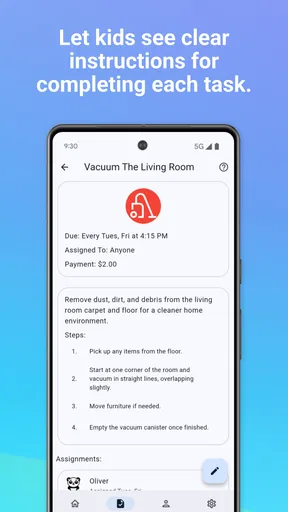
For a smoother trial, I’d start with a small set of chores that already happen regularly instead of trying to record every household responsibility. Give each task a clear owner and a realistic frequency, then check after a week whether the reminders and assignments reduced confusion. If the family is still arguing about what “clean the kitchen” means, split that broad label into concrete steps before adding more tasks. Clear wording is more valuable than a long, impressive-looking list.
Where it fits—and where it doesn’t
This is a strong fit for parents who want children to take part in routine household work, especially when visible reminders and agreed rewards help keep everyone engaged. It can also suit a household with multiple adults who want to make recurring responsibilities easier to track. The app’s parenting focus and Everyone age rating make it approachable for a broad family audience, while the group-based setup gives the household a shared reference point rather than leaving one person to manage every reminder alone.
Compared with a paper chore chart, the app offers a changing calendar and notifications, so the schedule does not have to be rewritten each time a routine shifts. Compared with a general calendar, its task-and-reward approach is more directly suited to motivating family participation. But a paper chart may be better for younger children who do not use a phone, and a basic shared calendar or household conversation may be enough for adults who only need to divide a few occasional jobs. The best option is the one everyone will actually check.
There is also a trade-off in making chores feel like a game. Points can give children a clear reason to begin, but they may encourage a transactional attitude if every contribution is treated as something that must earn a prize. I’d use rewards as a nudge, not as the only explanation for why people help at home. Some responsibilities are simply part of living together, and the app works best when that expectation is discussed alongside the fun incentives.
Practical limits to consider
The system depends on participation and on someone keeping the schedule sensible. If one adult creates every task, decides every reward, and handles every correction, the app can become another management tool for that person instead of a shared household habit. Asking each member to help choose a few duties can make the arrangement feel less imposed. At the same time, families should be prepared to revisit assignments when school, work, or other commitments change; a recurring task can become unfair if its owner’s routine changes and nobody notices.
Notifications are helpful when they prompt action, but they can become background noise if the app is used to remind people about too many small things. I would reserve reminders for tasks that are genuinely easy to forget and let ordinary routines stay ordinary. Similarly, a calendar is most useful when it remains readable. If every minor household action is entered, the important deadlines may be harder to spot, so selective scheduling is a practical advantage rather than a compromise.
One question families often have is whether this can replace a family discussion. In my view, it cannot—and shouldn’t. The app can show the agreed plan, but it cannot decide whether a chore is age-appropriate, whether someone has too much on their plate, or how to handle a missed task fairly. Use it to record decisions after talking them through, not to settle disagreements by pointing at a screen.
Another consideration is cost. The app is free to start, while optional purchases are listed at $3.99 to $19.99 per item. I would first decide whether the basic routine works for your household before spending on extras. A paid item is only worthwhile if it solves a real problem for your family; the presence of in-app purchases does not mean you need to buy something to begin organizing chores.
Device compatibility is also worth checking before you plan a whole household around it. The listed minimum operating system is Android 7.0, so a device running an older version may not be suitable. If one family member cannot use the app, keep a simple fallback such as discussing their responsibilities at a regular check-in rather than letting access become a reason they are left out of the system.
What I’d watch as it develops
Because this is a relatively recent app and its current version is 1.6.1, I’d pay attention to how comfortably it handles the ordinary changes families make over time: adjusting task frequency, keeping the calendar useful, and maintaining engagement after the novelty of earning points wears off. Those are areas to observe, not promises about future updates. Existing users can judge each new version against the routine they already rely on, while new users can begin with a small trial and see whether the app’s approach suits their household.
I’d also watch whether the reward structure continues to feel fair to everyone involved. A system that works for one child may not motivate a sibling in the same way, and adults may prefer simple accountability over points. That does not make the app unsuitable; it means the family should treat its setup as adjustable. The most helpful version of a chore plan is not necessarily the one with the most entries, but the one that makes responsibilities clear without creating extra work.
Overall, Family Chore Manager is a solid choice for keeping your household running smoothly. It’s like having a digital assistant that keeps everyone on track and, more importantly, keeps the peace. If you’re looking to bring a little more organization and accountability into your daily routine, give it a whirl. You might just find that those dreaded chores become a bit more manageable—and maybe even fun!
Verdict
Strengths of Family Chore Manager
- Easy-to-use interface for all ages.
- Customizable chore lists for families.
- Reward system motivates participation.
- Syncs across multiple devices.
- Notification reminders for tasks.
Limitations of Family Chore Manager
- Limited features in the free version.
- No offline mode available.
- Occasional sync delays reported.
- Reward options are somewhat limited.
- Lacks integration with smart home devices.
Similar Picks in This Category
View All
Family Space
Motorola Mobility LLC.3.9

شرطة الأطفال - مكالمة وهمية
Oub Apps4.1

Findmykids: Parental Control
LETEM LTD4.6

Pregnancy + | Tracker App
Philips Electronics UK Limited4.8

Policía de niños - para padres
Kids police4.7

Pregnancy App
Amila4.9
Frequently Asked Questions
What is Family Chore Manager and how does it work?
Family Chore Manager is an app designed to help families organize and manage household tasks efficiently. It allows users to assign chores to different family members, set deadlines, and track progress. The app provides reminders and notifications to ensure tasks are completed on time, promoting accountability and teamwork within the household.
Is Family Chore Manager suitable for all ages?
Yes, Family Chore Manager is designed to be user-friendly for all ages. The interface is intuitive, making it easy for children and adults alike to navigate. Parents can assign age-appropriate tasks to children, helping them learn responsibility while ensuring that the chores are manageable for younger users.
Can I customize the chore list in Family Chore Manager?
Absolutely! Family Chore Manager offers a high level of customization to suit your household's needs. You can create and edit chore lists, assign tasks to specific family members, and set priorities or deadlines. The app’s flexibility ensures that it can be tailored to fit the unique dynamics and requirements of any family.
Does Family Chore Manager offer any motivational features?
Yes, the app includes various motivational features such as reward systems and progress tracking. Users can earn points or rewards for completed tasks, which can be redeemed for agreed-upon incentives. This gamification aspect encourages family members to stay engaged and motivated to complete their chores consistently.
Is Family Chore Manager available on both Android and iOS?
Family Chore Manager is available for download on both Android and iOS platforms. You can find it in the Google Play Store and the Apple App Store. This cross-platform availability ensures that all family members, regardless of their device preference, can participate and stay connected.
